Your AI Task
Planning Assistant
Tasky is an AI task planner that turns your brief into structured, prioritized tasks — automatically.
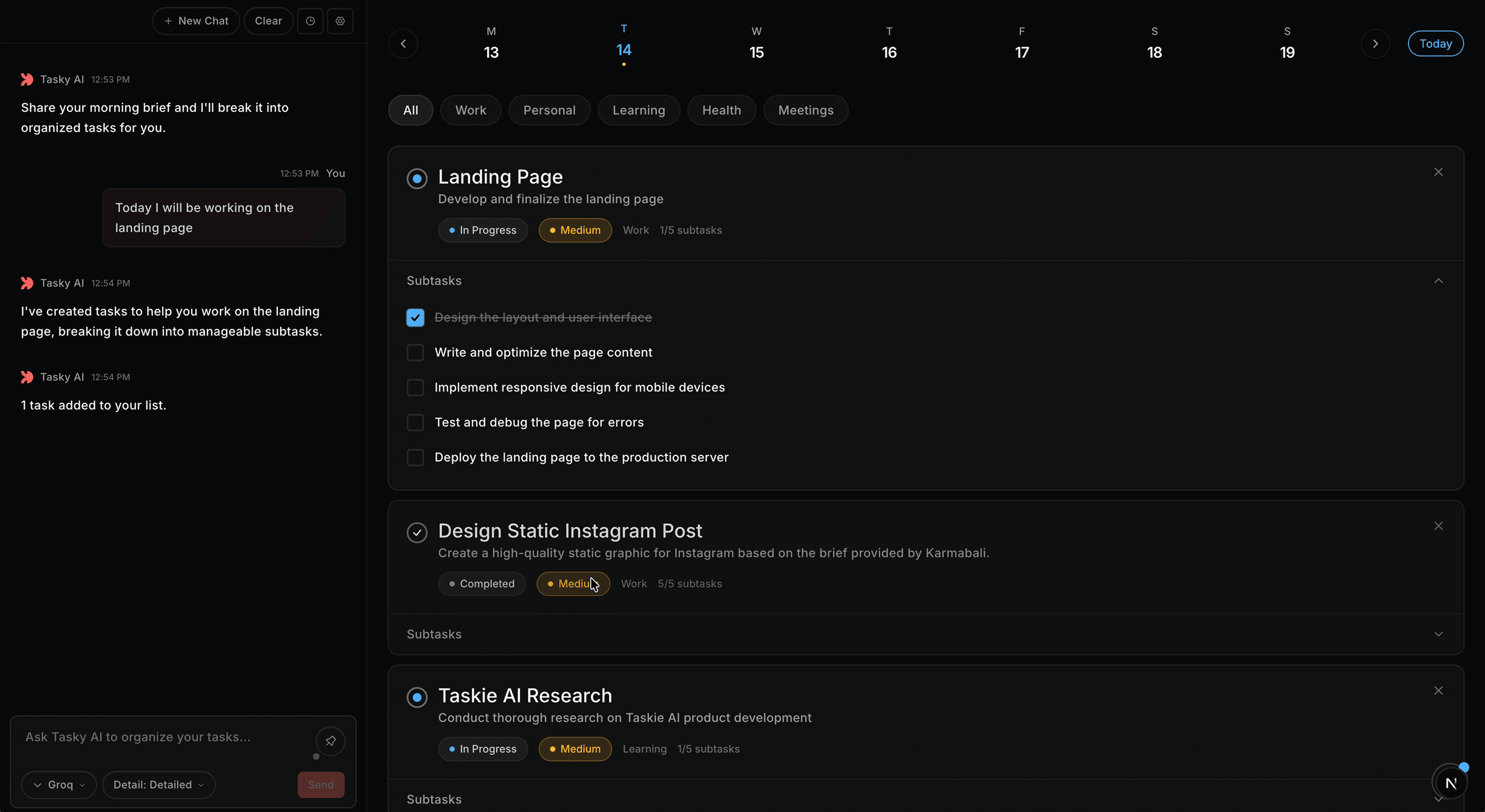
How to plan your day with AI in three steps
Type a brief — Tasky breaks it into prioritized tasks with subtasks and categories.
Type your brief
Say what you need to do in plain language. No templates or formatting required.
AI organizes it
Tasky reads your brief, detects categories, assigns priorities, and generates subtasks — automatically.
Get structured tasks
Walk away with a prioritized, categorized task list with subtasks. Ready to execute immediately.
Watch AI task planning in action
See how Tasky turns an unstructured brief into organized tasks — in under two minutes.
AI task planning features
that replace your todo app
From brief to structured tasks in seconds — categorization, priorities, subtasks, and file context.
AI-Powered Task Breakdown
Turn any brief into structured tasks. AI generates subtasks, sets priorities, and assigns categories — no manual work.
Smart Categorization
AI detects categories — Work, Personal, Health, Learning — so every task lands in the right place automatically.
Priority Detection
AI assigns priority levels based on urgency signals in your brief. Always start with what matters most.
Subtask Generation
Every task breaks into clear, actionable steps. Start executing instead of planning what to do.
Chat History
Every conversation is saved. Revisit past briefs and refine your tasks with full context.
File Context
Upload PDFs or spreadsheets — AI reads the content and creates tasks. Meeting notes become action items.
AI task planner pricing
plans and features
Choose the plan that fits your workflow. All plans include AI task breakdown, categorization, and priority detection.
Starter
50 tasks per month, standard AI model, core features.
- Up to 50 tasks per month
- Standard AI model
- 7-day chat history
- 5 file uploads per month
- Smart categorization & priority
- Subtask breakdown
- Custom integrations
- Priority support
- Early access to new features
- Custom categories
- Export tasks (PDF / CSV)
- Priority AI responses
Pro
Billed as $22/3 months ($7.33/mo)
Unlimited tasks, advanced AI model, unlimited history, and priority support.
- Unlimited tasks
- Advanced AI model
- Unlimited chat history
- Unlimited file uploads
- Smart categorization & priority
- Subtask breakdown
- Custom integrations
- Priority support
- Early access to new features
- Custom categories
- Export tasks (PDF / CSV)
- Priority AI responses
Premium
Billed as $79/year ($6.58/mo)
Everything in Pro plus custom categories, exports, and priority AI responses.
- Unlimited tasks
- Advanced AI model
- Unlimited chat history
- Unlimited file uploads
- Smart categorization & priority
- Subtask breakdown
- Custom integrations
- Priority support
- Early access to new features
- Custom categories
- Export tasks (PDF / CSV)
- Priority AI responses
No credit card required · 14-day free trial · Cancel anytime
What users say about
TaskyAI task planner
Real workflows from professionals who plan their day with AI.
I type my brief and get organized tasks — priorities, subtasks, and categories all assigned automatically.
Planning my day used to take 30 minutes. With Tasky, it takes 30 seconds. The subtask breakdown saves me hours each week.
The AI priority detection means I always start with what matters most. No more second-guessing my to-do list.
The categorization is the most accurate I've seen. Every task lands in the right category without manual tagging.
I've tried Todoist, Notion, and Linear. Tasky is the first where I actually stick with it — zero setup friction.
The priority detection is what sold me. I always know which task to tackle first after entering my brief.
Uploading meeting notes as a PDF and getting instant, actionable tasks back — that's when I knew this was different.
Getting structured, prioritized tasks from a meeting transcript was the moment I knew this was built different.
Replaced three apps in my workflow — planner, notes, and task manager. Everything in one place now.
Frequently asked questions
Got questions? Reach out to our support team if you need anything else.